
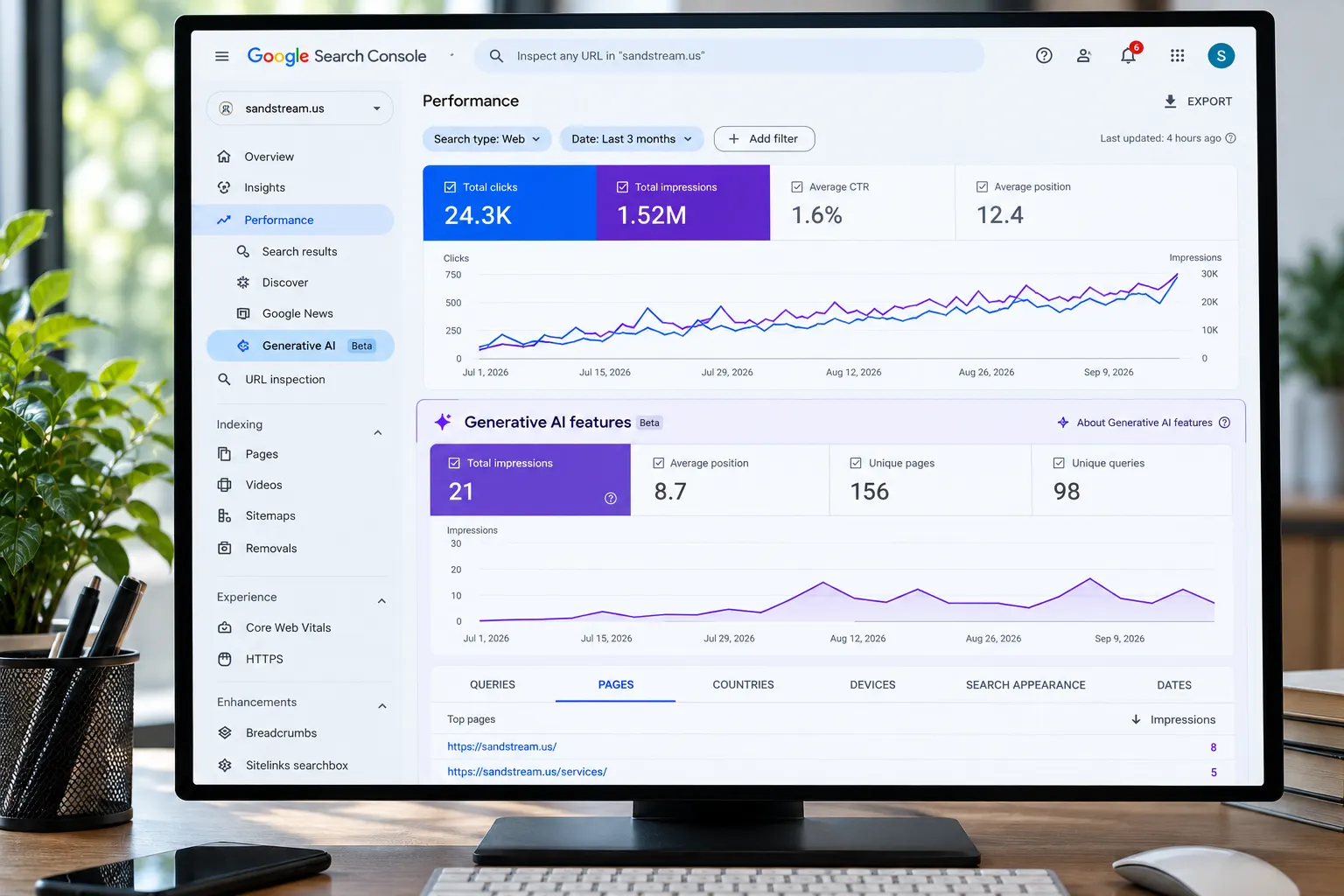
Search is changing quickly. People are no longer relying only on traditional Google results to find information, compare businesses, research products, or solve problems. Google now uses generative AI features such as AI Overviews and AI Mode to provide more direct, conversational answers.
For businesses, this creates an important SEO question:
How do you know whether your website is actually appearing in Google’s AI search results?
Google Search Console now provides a much better answer through its Generative AI performance report.
The Google Search Console Generative AI report helps website owners understand how often their pages receive impressions in Google’s generative AI search features. You can use the data to identify pages gaining AI visibility, compare performance over time, and understand where those impressions are coming from.
However, the report is not a complete AI traffic or lead-generation report. It tells you about visibility and impressions, while other analytics and business systems are needed to understand visits, conversions, leads, and revenue.
This guide explains how to use the report correctly and turn the data into an actionable AI search optimization strategy.
What Is the Google Search Console Generative AI Report?
The Google Search Console Generative AI report is a performance report designed to show how your website performs in Google’s generative AI search features.
For Google Search, the report covers AI-generated search experiences such as:
- Google AI Overviews
- Google AI Mode
Google rolled out the Generative AI performance insights worldwide by August 31, 2026. The report can show your site’s generative AI impressions over time and break them down by pages, countries, and devices.
This gives SEO teams a new way to measure AI search visibility.
Traditional Search Console reporting answers questions such as:
- How many clicks did my website receive?
- Which search queries generated impressions?
- Which pages receive the most clicks?
- What is my average position?
The Generative AI report answers a different question:
How often are my pages being shown through Google’s generative AI search experiences?
That distinction is important because AI visibility is becoming another layer of search performance.
Why AI Search Visibility Matters for Businesses
Traditional SEO has generally focused on ranking a page in Google’s search results.
AI search adds another opportunity: becoming a source that Google’s AI systems can use or link to when generating an answer.
For example, a business might rank well for:
“digital marketing agency Omaha”
But a user could instead ask an AI-powered search experience:
“What are the best digital marketing agencies for a small business in Omaha?”
The search experience may generate an answer that includes links to several relevant websites.
This means your SEO strategy needs to consider more than traditional rankings.
You need to understand:
Can Google discover, understand, trust, and surface my content in AI-generated search experiences?
The Generative AI report gives you a measurable visibility signal.
It does not guarantee that a page will appear for every relevant question, but it can show whether your website is gaining exposure within Google’s generative AI search features.
What Does the Google Generative AI Report Measure?
The most important metric in the report is impressions.
An impression indicates that a link to your website appeared in a supported generative AI search feature.
You can analyze the data using dimensions such as:
- Date
- Page
- Country
- Device
This allows you to identify trends that may not be obvious in traditional SEO reporting.
For example, you may discover that:
- One blog receives most of your AI impressions.
- Several service pages are beginning to gain AI visibility.
- AI impressions are increasing in a specific country.
- Mobile users generate more AI visibility than desktop users.
- A recently updated page starts receiving more AI impressions.
These insights can help you decide where to focus your next optimization efforts.
What the Report Does Not Tell You
This is one of the most important things to understand.
The Generative AI report should not be treated as a complete AI attribution platform.
It does not provide a complete picture of:
- Which exact prompt caused an AI appearance
- Why Google selected your page
- The exact wording of the AI response
- Where your link appeared within the AI response
- Whether a user clicked your link
- Whether the user became a lead
- Whether the appearance generated revenue
In other words:
An AI impression means visibility, not a confirmed website visit or conversion.
This is why businesses should combine Search Console data with website analytics and conversion data.
Google’s standard Search Console performance report remains useful for traditional Search clicks and impressions, while analytics and CRM data can help connect website activity to leads and customers.
How to Find the Generative AI Report in Google Search Console
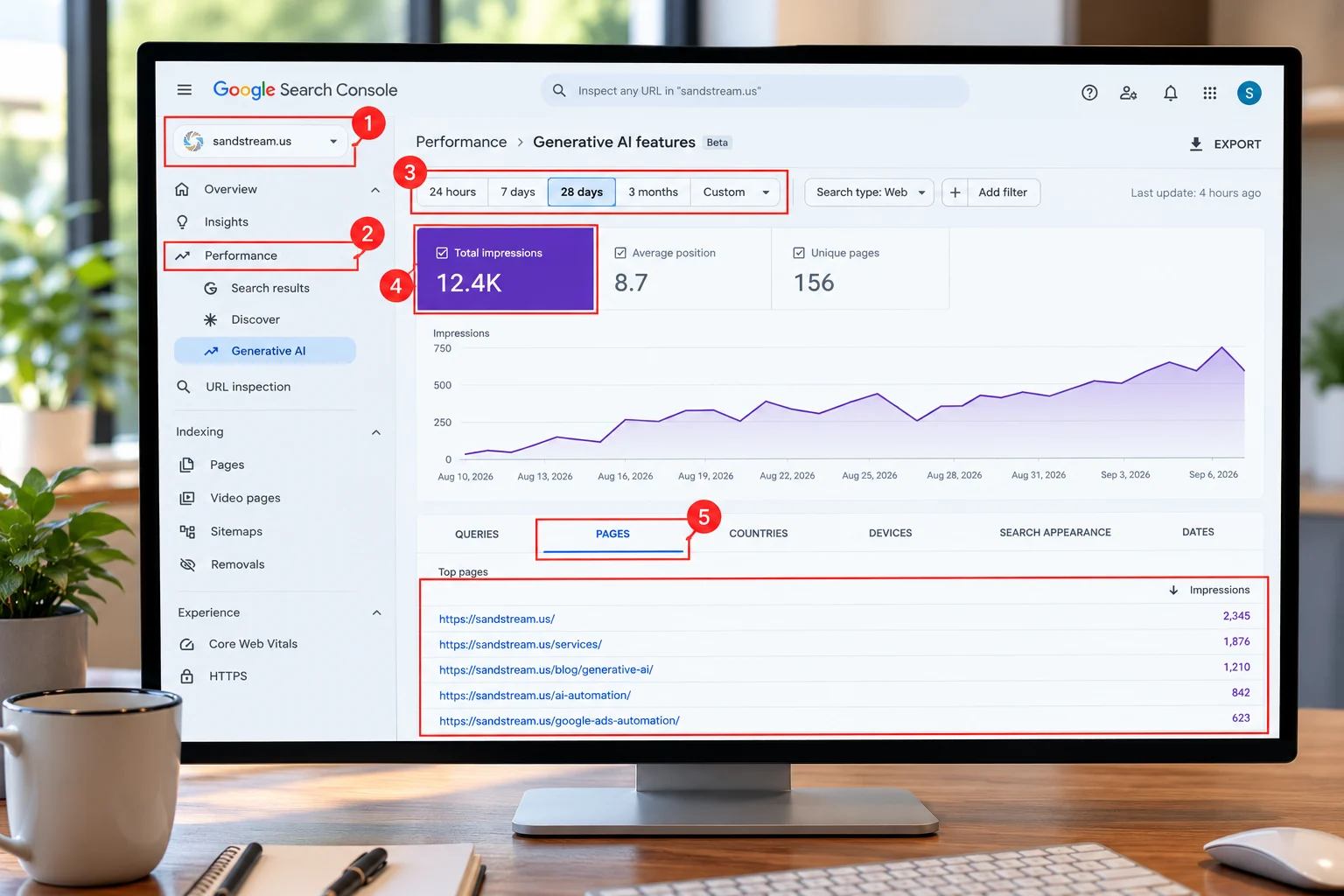
To start measuring your AI search visibility:
Step 1: Open Google Search Console
Sign in to Google Search Console and select the website property you want to analyze.
Make sure you are using the correct domain or URL-prefix property.
Step 2: Open the Performance Section
Look for the Generative AI performance report under the Performance area of Search Console.
The Search report is separate from the Generative AI report for Discover.
Step 3: Select a Date Range
Start with a meaningful comparison period.
For example:
- Last 28 days vs. previous 28 days
- Last 3 months vs. previous 3 months
- Month over month
- Before and after a major content update
Avoid making conclusions from a very short period because AI search visibility can fluctuate.
Step 4: Review Total Impressions
Start with the overall impression trend.
Ask:
Are generative AI impressions increasing, decreasing, or staying flat?
An increase can indicate that your website is gaining exposure in Google’s AI search features.
A decrease does not automatically mean your SEO strategy has failed. Search behavior, content changes, Google updates, competition, and AI-result composition can all affect visibility.
Step 5: Analyze Your Top Pages
The Pages dimension is particularly useful.
Find the URLs receiving the highest number of generative AI impressions.
These pages are valuable because they provide evidence of content that is already gaining visibility in AI search.
Don’t immediately rewrite them.
First ask:
- What search intent does the page satisfy?
- Is the answer easy to understand?
- Does the page provide original information?
- Are important facts clearly stated?
- Are headings descriptive?
- Does the page answer related questions?
- Is the content relevant to the business?
- Does the page provide a useful next step for visitors?
These questions help turn visibility data into an optimization strategy.
How to Use the Report to Improve AI Search Visibility
The report becomes much more useful when you treat it as a starting point rather than a scorecard.
Here is a practical process.
1. Identify Your AI-Visible Pages
Start by creating a list of pages that receive the most generative AI impressions.
Group them into categories such as:
- Blog posts
- Service pages
- Location pages
- Product pages
- Resource pages
- Industry pages
This helps you determine which types of content are gaining AI visibility.
For example, if informational blog posts dominate your AI impressions, you may need to create more content around customer questions.
If service pages are receiving impressions, your commercial content may already be gaining traction in AI search.
2. Find Content Gaps Around Successful Pages
Suppose one article about digital marketing receives strong AI visibility.
Don’t only optimize that article.
Look for related questions your audience may ask.
For example:
- What does digital marketing include?
- How much does digital marketing cost?
- How does SEO help a local business?
- What should a small business measure?
- Which digital marketing channels generate leads?
You can build supporting content around these related questions.
This creates a stronger topical structure and gives search engines more useful information to understand your expertise.
3. Improve Answer Clarity
AI systems need to understand what your content actually says.
Make important answers easy to find.
Instead of writing several paragraphs before answering a question, provide a direct answer first and then explain it.
For example:
What is AI search visibility?
AI search visibility is the frequency with which a website’s content or links appear in AI-powered search experiences such as Google AI Overviews and AI Mode.
Then expand on the answer.
This structure is useful for both human readers and answer engines.
4. Build Content Around Real Questions
AEO is not simply adding an FAQ section to every page.
It is about making content genuinely useful for questions people ask.
Use questions related to your products, services, locations, and industries.
For a digital marketing business, examples might include:
- How can a business appear in Google AI Overviews?
- How do I measure AI search visibility?
- Can Google Search Console track AI Mode?
- How can businesses increase AI search visibility?
- What is the difference between SEO and AEO?
Answer each question accurately and directly.
5. Strengthen Local Relevance
For businesses targeting local customers, GEO matters.
Google needs enough context to understand where a business operates and which audiences it serves.
Include relevant local information naturally, such as:
- City and region
- Services available in that area
- Industries served
- Local customer problems
- Business experience
- Relevant service locations
For example, SandStream positions itself as a digital marketing provider based in Omaha and offers customized digital marketing solutions, data strategy, email marketing, creative services, and lead-generation solutions.
This type of business and location context can support local search relevance without forcing keywords into every paragraph.
How to Track AI Search Traffic Beyond Search Console
One common mistake is assuming that the Generative AI report directly tells you how much traffic AI search generated.
It doesn’t.
To track AI search traffic and business impact more effectively, use multiple data sources.
Google Search Console
Use the Generative AI report for:
AI visibility and impressions.
Standard Search Console Performance Report
Use the traditional Performance report for:
- Search clicks
- Search impressions
- Queries
- Average position
- Pages
Google’s standard Search performance report provides query and click-related information that the Generative AI report does not provide in the same way.
Google Analytics or Another Analytics Platform
Use your analytics platform to monitor:
- Sessions
- Landing pages
- Engagement
- Conversions
- Form submissions
- Phone clicks
- Other valuable actions
CRM or Sales Data
Finally, connect marketing activity to actual business outcomes.
Track:
- Qualified leads
- Sales opportunities
- Customers
- Revenue
This gives you a much more complete measurement framework:
AI impressions → Search visibility → Website visits → Engagement → Leads → Customers
Do not assume that every conversion came from AI search simply because AI impressions increased.
Instead, use the data as different layers of the customer journey.
How to Measure Google AI Search Performance Month Over Month
A simple monthly dashboard can make the new report much more useful.
Track these five areas:
1. Total AI impressions
Are your AI impressions growing?
2. Top AI-visible pages
Which URLs are appearing most often?
3. Growth by page
Which pages gained or lost visibility?
4. Country and device trends
Where is your AI visibility coming from?
5. Business outcomes
Are important pages also generating visits, leads, and conversions?
For example:
| Metric | What It Tells You |
|---|---|
| AI impressions | AI search visibility |
| Top pages | Content gaining exposure |
| Country | Geographic visibility |
| Device | User/device trends |
| Organic clicks | Traditional search traffic |
| Conversions | Business impact |
| Leads | Marketing value |
| Revenue | Commercial value |
This prevents your team from treating one AI metric as the entire SEO strategy.
How to Improve AI Mode Search Performance
Google AI Mode is designed for more conversational and exploratory searches.
That means content should be useful beyond one short keyword.
Instead of creating a page only around:
“digital marketing agency Omaha”
build content that answers the broader customer journey.
A potential customer may ask:
- What does a digital marketing agency do?
- How much does digital marketing cost?
- What services should a small business use?
- How can I generate more leads?
- How long does SEO take?
- How do I measure digital marketing ROI?
- Which marketing channels should I prioritize?
Content that addresses connected questions can provide stronger contextual coverage.
This is where AEO and traditional SEO work together.
Your goal is not to write content specifically for an AI crawler.
Your goal is to create clear, accurate, useful content that can be understood by search engines, AI systems, and people.
How to Optimize a Page That Already Has AI Impressions
If a page already appears in the Generative AI report, don’t automatically make major changes.
Use this five-step process:
Step 1: Preserve what is working.
Identify the sections that directly answer the page’s main intent.
Step 2: Improve clarity.
Break complicated explanations into shorter sections.
Step 3: Add useful supporting questions.
Cover closely related questions that your audience is likely to ask.
Step 4: Add evidence and expertise.
Use original data, examples, processes, experience, or first-hand insights where appropriate.
Step 5: Strengthen conversion paths.
Make sure visitors know what to do next.
For a service business, that could mean:
- Request a consultation
- Contact the team
- Get a quote
- Learn about a service
- Download a resource
AI visibility is valuable, but the final objective is not simply to appear in an AI answer.
The objective is to turn visibility into useful business outcomes.
What If Your Generative AI Report Has Little or No Data?
Don’t panic.
Low or zero impressions do not automatically mean your website is invisible across every AI platform.
The Google Search Console report focuses on Google’s supported generative AI search experiences.
It also may take time for sufficient data to appear for a property. Google notes that a report may not appear when a site has not received enough impressions from generative AI features.
If your report is empty or very small, review:
- Indexing
- Organic search performance
- Content quality
- Search intent coverage
- Internal linking
- Topical authority
- Local relevance
- Technical SEO
- Page experience
- Originality and usefulness
Also check whether your site is included in Google’s generative AI search features.
Google provides a Search generative AI control in Search Console that lets site owners manage inclusion in AI Overviews, AI Mode, and certain generative AI experiences in Discover.
How SandStream Can Help Businesses Measure AI Search Visibility
AI search optimization is becoming less about guessing whether a brand appears in AI results and more about building a measurable strategy.
SandStream combines digital marketing, data strategy, lead generation, email marketing, creative services, and technology-focused marketing solutions. Its data strategy services are designed to help businesses organize, analyze, and use marketing data to make better decisions.
For businesses adapting to AI-powered search, that combination matters.
A strong strategy should connect:
SEO + AEO + GEO + analytics + conversion tracking + business data
Rather than optimizing content only to increase rankings, businesses can use performance data to determine which content attracts visibility, which pages create engagement, and which marketing activities contribute to growth.
If your business is seeing changes in organic performance because customers are using AI-powered search differently, measuring those changes should be part of your broader digital marketing strategy.
Final Takeaway
The Google Search Console Generative AI report gives businesses something they have needed as search evolves: a dedicated way to see whether their content is gaining visibility inside Google’s generative AI search experiences.
The smartest way to use it is not to chase impressions alone.
Use the report to identify which pages are gaining AI visibility. Then analyze those pages, improve related content, answer important customer questions, strengthen topical and local relevance, and connect visibility data with analytics and business outcomes.
The measurement process is simple:
Measure AI visibility → identify winning pages → improve content → strengthen topical coverage → track website activity → measure leads and revenue.